Friday, April 5, 2013

The "Unlike" Project - First Month

Just over a month ago, I wrote this post explaining that I was beginning a campaign to "Unlike" things on Facebook. The idea was to start reversing one of my "Likes" on Facebook ever day, and then tweeting about it using the hashtag #UnlikeProject. The experience has been interesting in a lot of ways - I thought I'd give my "first 30 days" report (although it's actually been more than 30 days) and let you know what's been going on.

The first thing I noticed is that it is incredibly difficult to decide what to Unlike. Fact is, the things I've "Liked" are things that, in real life, I in fact do actually like! It feels a little bit like a betrayal, especially when you are Unliking things like The Bible or your favorite sports teams. It's also difficult to find the things that are less important to me so I can Unlike them first - I wound up making myself a list to make prioritizing easier. I don't intent to Unlike everything, so I need to make sure I find the things I want to free myself from first. (Pages set up by friends of mine, for example, or organizations that I genuinely do want to stay in touch with will probably stay in my "Likes".)

Some of the earliest casualties were Pages that post a lot. The reasons those got the axe first was that I was more likely to see their posts in my News Feed and remember "Oh yeah, it annoys me when I see them there!" or "Their posts are never interesting," and then I could wipe them out and be done with it. But even with the easy pickings of those frequent posters and with my "Unlike first" list, I still didn't Unlike something every day - once I Unliked two things in one day, and four or five days I forgot altogether.

Two different organizations actually saw my "Today I Unliked..." tweets and responded to them, apologizing for whatever they did that put me off. Fact is, they didn't do anything, and I told them so! This is all about cleaning things out and simplifying... and insulating myself and my friends from invasive advertising as much as possible. I do have a positive opinion of those organizations, thought... kudos for keeping an eye on your Twitter mentions (I didn't actually even mention them by @ handle, so they're watching keywords) and reaching out to people based on that! That's the way to DO social media!

During the month, I also discovered a few facts that back up my reasons for doing this:
I'm actually enjoying the project - there's a sense of freedom in it, like when you've cleaned out the junk from the garage or gotten all the bills paid for the month. Maybe you'll give it a try? If you do, make sure you remember to tweet your Unlikes with hashtag #UnlikeProject so I'll know you're in!


Is it nuts to just start Unliking things that you actually do like? Why will you be joining the project, or why not? Sound off below by clicking the "Comment" link!

Saturday, March 16, 2013

Google Collects Things People Shouted From Rooftops - Ordered to Pay Someone Else As Punishment

from DailyTech:

Google Ordered to Pay $7 Million to U.S. States for Wi-Fi Snooping Incident

Google is finally settling a three-year investigation this week into a Wi-Fi incident that occurred when compiling data for its mapping service.

Google's Street View mapping cars had accidentally collected personal data, such as home wireless network passwords, between 2008 and 2010. The cars were out collecting images and data for the Street View mapping system in Google Maps, and were using an experimental computer code in the cars' software while doing so. This led to the accidental collection of personal data.

The settlement orders that Google split $7 million among 38 states in the U.S. and the District of Columbia, which were involved in the incident.
Read the rest here.

First off, some background. A few years ago when Google's cars were driving around the country taking the pictures that are now part of the popular "street view" part of Google Maps, the cars were (accidentally, Google says) also taking snapshots of something else. As they were driving around photographing streets, businesses, neighborhoods, apartment buildings, and everything else, the cars also had software running that was recording Wi-Fi signals.

Why did this cause a problem? Because whatever you do with your wireless laptop, smartphone, tablet computer, or anything else that communicates over Wi-Fi could be intercepted and recorded. This is a basic principle of radio communication. This can include instant messages, emails, Web browser requests (like what URL you are visiting)... anything that you do on your Wi-Fi.

Does this creep you out? Well, it shouldn't. Because you should have the sense to do something very basic on your home Wi-Fi: put a password on it. Don't leave your Wi-Fi in the open. When you put a password on your Wi-Fi, it is encrypted, and although traffic can be recorded, it doesn't make any difference... because it's in a code which nobody likely cares enough to try to break. It's secure enough that recording it doesn't make any difference.

On top of that, if you are logging into a site... say, your bank, or your credit card provider... the URL on your Web browser should start with "https://" (and not just "http://" - the "s" is the important part). If it does not, it's time to choose another bank. The "s" means that the bank is encrypting (encoding) all of the communication between you and it, so even if you are on an unprotected Wi-Fi network, your password and other communication is still in a code that is too strong to be worth trying to break.

So despite the fact that most everyone has gotten the clue and set up passwords on their Wi-Fi, and despite the fact that even email services lik Gmail encrypt your password with https://. and despite the fact that Google admits that it recorded the Wi-Fi signals and says it was an accident, and despite the fact that they have promised to erase the recorded information... Google is being told to pay some sort of punitive damages.

But not to the people who had Wi-Fi signals recorded. Not to the individuals. Directly to the states.

How were state governments harmed by this? They weren't. Really, the consumers weren't harmed either. This is a tempest in a teacup. And how does a $7 million settlement teach anything to a $100+ billion company? It doesn't. Google probably contributes that much to the United Way every year. Heck, Google probably spends that much in fuel for the Street View cars every year!

This whole thing is silly. I hope at least part of that settlement with the states goes to pay the salaries for the judge and other people the courts employs to hear cases like this, so none of my taxpayer dollars paid for it.

Thursday, March 14, 2013

A Situation - And A Recipe

I just got an email. The email says "Your cell phone battery is getting low!" I checked my phone, and sure enough, the battery was down to 15%, so I plugged it in to charge during the afternoon so I don't run out of juice before bedtime tonight. Who emailed me? Well, the cell phone did, of course! Actually, it texted me... but let me start from the beginning.


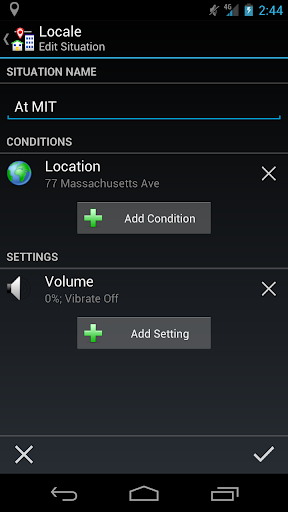
A Locale Situation
One afternoon a few weeks ago I realized (when I was already on my commute home from work) that my phone battery had run down. I have charging cables in the car, of course, but my commute is only long enough to charge it partway... I ran out of power again later that evening. I realized that I had already set up something to check the battery level of my phone: a "Situation" in an app I use called Locale. In a nutshell, a Locale Situation monitors "Conditions" (such as your physical location, the time, or whether your phone is face-up or face-down) and when they match a set of Conditions you have configured, it activates "Settings" which can be settings on your phone or might be other actions. The app allows you to add new Conditions and Settings through a plug-in architecture. I've set it up to do things like make sure Wi-Fi is on when I'm at home and turn off the ringer when I'm at church.

I had also set it up to turn down the brightness of my display automatically when the battery power is below 15%, on the theory that this will stretch the battery just a little longer. That didn't help me realize that the battery was getting low that day, though, so I wanted to do something more.

Enter the Send SMS Plug-in. When you install the plug-in, you get a new "Setting" in your options - the "Setting" does not change a setting on your phone, but instead it automatically sends an SMS message from your phone to whatever recipient you like. This is terrific, but I didn't really want to be notified via SMS on my phone. When I'm at work and my battery gets low, I want to get an email... I monitor my work email closely when I'm at my desk, much more closely than I monitor the SMS stream on the phone itself. I tried sending an email through the Send SMS Plug-in, but even though you can do that through the stock SMS app, you couldn't do it through Send SMS. There are other apps (like this one) which I could have used, but SMS messages can often be sent even when the phone is having trouble connecting to the Internet. I wanted to send an SMS message, but receive an Email.

Enter IFTTT.

IFTTT (pronounced exactly how it looks, like the word "if" and then the letter "t") stands for "IF This Then That." And that adequately describes what IFTTT does - you associate it with things you do (Twitter, Facebook, blogs, CraigsList, Evernote, the time, the weather, etc.), and then configure associations so that if a certain condition exists on one of those things, something happens on another of them. The "things" are called "Channels" and they may act as either the instigator or the recipient of an action. For example, when this blog post is published, IFTTT will see it in the RSS feed and will automatically schedule it to go out to my Twitter stream via HootSuite. In this way (if a condition exists, do something) it is similar to Locale, except almost every IFTTT Channel can be checked (like a Locale "Condition") or do something (like a Locale "Setting").

IFTTT has Channels for SMS and Phone Calls. Once you've set them up to match your phone, an SMS message from you can trigger something (for example, automatically save the SMS to a new note in Evernote), or IFTTT can send an SMS to your phone. The Phone Call channel can either receive a call (which it then can transcribe) or place a call using text-to-speech. Finally, IFTTT can send an email, using the Email channel, to any address you like.

Bingo!

I set up an IFTTT "Recipe" to receive SMS messages from my phone with a Twitter-style tag which indicates that I am at work, and forward those messages to my work email address. Then I set up Locale to check my battery level and my SSID, and if I'm on my work WiFi network, Send an SMS reading "Your cell phone battery is getting low!" with the special "I'm at work" tag to the IFTTT SMS number. I also set up a separate Locale/IFTTT combo to actually call me via voice if my battery gets low and I'm not at my desk! In theory, I should never again discover that my phone battery is discharged below the point of no return... I should always know about it ahead of time.

So that's how I wound up today getting an email from my phone that the battery was low. Pretty cool? Yes. A little convoluted? Kinda. Pretty geeky? Definitely. Useful? ABSOLUTELY.

Do you use Locale or IFTTT? Have you set up any groovy Situations or Recipes that you'd like to share? Have you ever used synergy between multiple online services to build something cooler than the component parts? Tell us about it below in the Comments!

Thursday, March 7, 2013

Terrestrial Radio Needs to Step It Up!

The radio industry has been in quite an uproar in the past ten years or so. Out of the sight-lines of most people, there has been a real struggle involving traditional "terrestrial" radio (which comes to you directly through the air to an old-fashioned AP or FM radio), satellite radio, and Internet radio. Each has its advantages and drawbacks; terrestrial radio is free and has the advantage of being local in scope (paradoxically, some stations have switched to a syndicated format with no local programming, giving up their biggest trump card over the others); satellite radio is available pretty much wherever you are for a monthly subscription fee which never changes, and there are a zillion channels to choose from; Internet radio offers even more stations than satellite, with the added benefit of being highly customizable (like Pandora or Songza).

Each of the three also has its drawbacks (terrestrial radio has a limited range, statellite radio requires the purchase of expensive equipment and has an ongoing subscription cost, Internet radio can be expensive based on your bandwidth usage and can be glitchy if you have a slow connection). Terrestrial radio stations have tried to fight back by broadcasting online in addition to their on-the-air signal; my guess is that this strategy meets with some degree of success, because these days it's not easy to find a terrestrial station which doesn't also have an online stream. But I think terrestrial radio stations are not doing everything they can to make technology work to their advantage.

For example: one of my cars has a radio that can display the name of the song you're listening to as it plays... if the radio station's transmitter is broadcasting that information. I'm amazed at the number of stations that either don't provide that information at all, or just continuously broadcast the station's call letters and station motto. Come on, people! This tech has been in place for years now! You KNOW you have this information. You've got a computer logging every song that is played anyway, and even if you don't, in this era when any smartphone with Soundhound or Shazam or Midomi or any number of other apps can instantly identify a song based on just a few seconds randomly selected from the middle of the song, there's no reason to not automatically provide that information to your listeners. And you don't even have to burn airtime having your DJ say the title. It's just THERE.

But if the terrestrial stations really want to keep people from heading to Best Buy and picking up that Sirius or XM box, I think there are things they could invest in as an industry that might keep people in their court.

I think every new automobile radio should have a GPS sensor in it. I don't think they should necessarily have navigation information built into them, but I think they should know where they are in the world. Why would this be useful in a radio? Because if you know where you are in the world, and you know what stations exist there, then you can provide a list of available stations to choose from. If there was a list that could be downloaded periodically, I'll bet people would go to the trouble to set it up. If you park your car in your garage and you have WiFi in your home, chances are your car could access that signal (maybe even using the car radio antenna!) and download. If you don't have a signal where you park but your cell phone has hotspot capability, you could use that to periodically update your list. Or you could park out in front of McDonald's or Starbuck's or somewhere else that has a free WiFi signal, and in a few seconds your list could be updated.

Or maybe there doesn't have to be a master list at all! It would be entirely possible for a radio, over time, to gauge the availability and strength of radio signals in places where the car goes, and build its own list over time. With digital memory as cheap as it is, you could store a great deal of information. Heck, it would even be possible to share that information with other radios nearby, so if you're sitting in a traffic jam or parking lot, your radio could be comparing notes with other radios about what frequencies are available where. You might find that you drive to a new place and your radio already knows what stations are there!

But let's back up even further. There are only a few places I frequent... I live in the Tulsa Oklahoma area, and my brother lives in the Dallas/Fort Worth metroplex. Sometimes we drive to Oklahoma City, and I have family in Shreveport Louisiana. In each of those places I have stations I like to listen to, but I only have twelve or so radio presets to play with. Just my Tulsa stations fill up those buttons; when I visit my brother in DFW, I have to reprogram my radio presets. Why not have an arbitrary number of preset banks, which are sensitive to location? Why can't my radio show my Tulsa presets when I'm in Tulsa, and when I'm in Dallas, show me my favorite stations down there?

And let's go even one step further. In Tulsa, one of the stations I listen to has three separate frequencies that all broadcast the same programming. Depending on where you are in town, any one of the three might have a stronger signal than the others. Why shouldn't I be able to group the three so that, based either on my physical location or signal strength, the channel automatically changes to the best signal? And even better: that station is one of those local stations that is actually part of a national network. They just launched a frequency in Dallas. Why can't my button for them in Tulsa be the button for the same programming when I get to Dallas? Stations could provide a downloadable list of their own frequencies that could be used to program this new, cool, technology-enhanced terrestrial radio. Heck, stations could even provide an internal link to their Internet streams if they wanted, so Internet-capable radios would be able to switch to the online stream when they are out of range of the over-the-air signal. I think it would make sense for the terrestrial radio industry to invest actual money in developing these technologies, because when they become available, it will benefit them tremendously.

I won't even go into things like the possibility of the radio being able to make suggestions based on genre (rock, country, talk, etc.) because those capabilities are already out there in some existing radios. That technology suffers from the same problem the Song ID technology suffers from: stations don't always provide that information in their signals. I could also brainstorm from the perspective of the marketers: transmit the station or show's call-in number with the signal so your radio could dial your cell phone for you (there's a "distracted driving" case for the lawyers) or use the GPS capability to let you know when one of the station's advertisers is nearby. There are so many ways that car radios could be enhanced, it's kind of sad that in general, car radios still do basically the same thing they did in the 1970s when you knew what station you were on by looking at where the stick was over the list of numbers.

Terrestrial radio hasn't been making the effort to beat out their competitors in outer space and on the Internet. Many new car radios come with a line-in jack; mine doesn't, but I have a small FM transmitter that I can use to play music from my cell phone through my car radio. Even now, I can choose Internet radio over terrestrial if I like. As bandwidth continues to get cheaper and Internet music services continue to get better, traditional radio needs to step up its game, or it's nothing but downhill from here.


(Since I wrote this post, I've learned that 4G is coming soon to a car near you. Get on the ball, radio stations!)


I'm not a radio industry professional, and it's entirely possible that I've gotten some of my details wrong. Do you know something that contradicts the ideas I've presented here? Any more ideas that could be incorporated into car radio technology that would make listening to over-the-air radio easier or more enjoyable? Has the terrestrial radio industry made an effort to help technology along? Join the discussion below in the comments section!

Thursday, February 28, 2013

The "Unlike" Project

'dislike button' photo (c) 2011, Sean MacEntee - license: http://creativecommons.org/licenses/by/2.0/Today I made a rash decision. I decided to Unlike stuff on Facebook.

The reasons for this are not irrational. The reason I've clicked "Like" on TV shows, musical artists, movies, and whatever, is usually because I want my profile to say things about me when people visit it and look at my details. You take a good look at that stuff when you look at people's profiles, right?

What do you mean, you never look at people's profiles?

Basically, I've come to believe that my reasoning for wanting to click "Like" on stuff (to tell my friends I like it) is flawed. My friends don't typically see it. If they do, they don't care.

You know why?

Because they see it in advertising.

The main reason Facebook has "Like" is so they can sell advertising to you and your friends. "Michael likes Coke, so maybe you, his friend, will like this ad from Coke!" (This is why, by the way, there probably will never be a "Dislike" button.) I find this annoying, and I've decided I'm not going to be complicit in it anymore... but I have far too many "Likes" to "Unlike" them all at once. Besides, I've "Liked" a few of them on purpose. I want to see updates from that band on the road, or hear what's going on with that software package I use, or whatever. So starting today, I've decided to "Unlike" one single thing I've "Liked" but have no reason to continue to "Like".

I'm tweeting my daily Unlikes in my Twitter stream, using the hashtag #UnlikeProject. Would you like to join me in this quest to stop littering our friends' Facebook feeds with advertising that looks like it came personally recommended? Great! Tweet your unlikes to Twitter when you do, and use the #UnlikeProject hashtag. Let's see how many people are freeing themselves from being stooges for Facebook's advertisers!


(After the first month, I wrote a followup post. Here it is!)


Do you have a different take on Facebook "Likes"? If you do, please click the "comments" link below and join the discussion! And if you are tweeting your Unlikes on Twitter, feel free to link to this post (a short link is http://bit.ly/FBUnlike) to explain your reasoning.

Sunday, April 15, 2012

Google Play Music: it's ALMOST there.

"Music in the Cloud." The phrase itself sounds sort of like "Pie in the Sky," doesn't it? Well, so far that's kind of been what cloud-based music has equated to. A year ago I blogged about this same thing, shortly after Amazon had released their music locker and many months before Google finally released their "Google Music" service, which has now been merged with their app store, the Google eBookstore, and movie rentals to be rebranded as "Google Play." (This post is about the music portion of Google Play, so I'm going to refer to it as Google Music for now to avoid being ambiguous.)

When Google Music was released I was pretty stoked. I had quickly bumped my head on the free space available in Amazon Cloud Player, and Google Music offers virtually unlimited space (you can upload 20,000 songs, which is way more than are in my library!) for free. Also, you can reportedly stream your music over the Internet to almost any device. This works pretty good on the Web, but I find the experience less than flawless on Android.

But before I tell you about my Android frustrations, I want to touch on a few problems with the Web player. I won't go into uploading music with the Music Manager; it's a little weird to not be able to upload them directly but instead have to point software at them and let it do it for you, but that's been covered already by others. I didn't find the upload experience particularly painful myself, and you only have to do it one time for the main body of your library, and then only occasionally (unless you buy your new music from Google, of course, and then it automatically shows up in your account without any uploading at all!) I find the player to be serviceable, but there are some things missing:
  • There's no good way to eliminate duplicates. This was never a problem for me until I tried to upload a new CD worth of songs in FLAC format when I had already uploaded them in MP3 format. There's no way to tell which is the higher-quality copy, and there's no way to mark several files for deletion all at once. I'd like to re-rip all of my CDs to FLAC (which is lossless) at some point and eliminate the old MP3s I ripped years ago, some at embarrassingly low quality to save space on old hard drives, but when I do so it will be a real pain in the next to replace them on Google Play.
  • Playlist functionality is pretty limited. I guess I'm spoiled by years of using Mediamonkey, but I would love to be able to have the player randomly select songs to play based on the star rating I give them, or some other classification, like "Christmas Music."
  • Oh, wait. There IS no star rating system. It's thumbs up or thumbs down, and that's the best you can do on Google Music. And the rating isn't uploaded with the file; I know some of the MP3s I uploaded had ratings on them already. Actually, I know that ALL of them had star ratings already!
  • Oh, wait again... there IS no way to assign a classification to the file, other than "Genre." In Mediamonkey I have a number of fields that I can use to classify files... I can automatically generate a playlist of songs for Christmas or Easter, or high-octane songs to keep me awake during my work day when there's no caffeine available. In the Google Play player, there's none of that.
But enough of that complaining; the Web player is serviceable, and it gives me instant access to my tracks from any Internet-connected computer. Could be cooler, but it gets the job done. My real gripe is with the Android app.

Come on, now. This is a Google service on a Google OS! Shouldn't it be AMAZING? Well yes, it should, but it's not... at least not on my lower-powered phone, a Samsung model that is called Vitality on Cricket (which is what I use) but which is called Admire on other carriers (I know MetroPCS has it by this name). The internal memory of this phone is a little cramped in this phone... only 125MB... and this is where many of the problems with the Google Music app seem to lie.
  • The app seems to keep the catalog of music you're storing in the cloud, plus complete copies of any tracks you have recently played, stored in the phone's internal memory. This, friends, is madness. There is no reason to stick this huge file in my 125MB of phone memory when I've got a perfectly good 8GB MicroSD card riding in there (and the phone can support up to 32GB!) There are certain things that are required to exist in that internal memory, including some uncooperative apps which refuse to be moved to the MicroSD card. At least the Google Play Music app itself can be moved to the MicroSD card!
  • Since the app fills up the internal memory with its own huge data file, after I use it for a while I wind up not being able to install new apps any more. Even if the app is going to wind up on the MicroSD card eventually, some free internal memory is required in order to install it in the first place. There are other high-profile apps that are offenders in this way as well... Facebook, Twitter, Gmail, Google Reader, and some others are the usual suspects on my phone.
  • So, in order to install new apps, I have to choose a few of these badly-behaved apps and do a "clear data" to free up some space. By the way, the fact that all of these apps are fighting for the same few MB of storage space also means that when I've got my huge Google Play Music file on my phone, I stop receiving new Gmail. Facebook, Twitter, Reader and the other members of this crew seem to somehow figure out how to keep operating... why not the other two apps from Google? On the Google OS? (Wait, did I mention before that this is Google software running on a Google OS?)
  • When I "clear data" on Google Play Music, I have to wait for EVER for it to re-download its data file. I have no idea why this would be. I've currently got 9,312 songs in Google Music. There's no reason that at least a list of the albums couldn't be downloaded via a good WiFi connection in less than a minute. Track names and album art could populate over time, but at least with the list of album names I could start to select albums, and if I select album the app could quickly download the track list, and then I could start a song streaming. As it is now, I usually have to wait overnight for the songs to populate.
  • Even then, even after waiting overnight, often the newest songs in my library aren't there. In fact, sometimes even days later, with WiFi available for a good 18-20 hours of the day in my home and workplace, those new songs don't show up. It's positively ridiculous.
  • Sometimes after a "clear data" I can't get the song library to re-download at all.
  • Fortunately, there is a "Refresh music from Google Music" link in the settings. Unfortunately, as far as I can tell, it doesn't do squat.
  • It is possible in the app to flag a track or album to be made available offline; when you do that, the audio data is downloaded to your phone (to that precious internal phone memory, apparently) so you can listen to it without streaming it. There is also a setting to allow that to happen automatically when you play a song, so that Lady Gaga track you listened to yesterday is automatically available offline today. Problem is, once you've downloaded that offline data, there doesn't seem to be a way to reclaim the space on your phone; if you flag it as not available offline, the size of that darn data file stays huge.
  • Every time you open the Google Play Music app, it reports the name of the last song you listened to to Android, even if you don't start it playing. This is not a problem except that I scrobble my song plays to Last.fm (want to see what I listen to?), so every time I open Google Play Music it scrobbles the last song I played again. I've sometimes wound up having to delete three or four consecutive scrobbles of a single song from my list.
  • Don't even get me started about automatic side-loading of tracks from my phone to my Google Music account. Dictate a shopping list into Evernote? It winds up in your Google Play Music. Record a radio talk show with TuneIn? It'll wind up in your Google Play Music. I don't know of any way to turn this off, or exclude files created by specific applications. I'd prefer to turn it off entirely... how often do I have an MP3 on my phone that I didn't already have on my computer? Here's a hint: NEVER.
I eventually gave up on the Google Play Music app. I haven't removed it from my phone, but it was so difficult to get it to work that I quit using it. Maybe if I had the snazziest Droid from Motorola and it had eighty zillion terabytes of internal memory I would be happy to let Google Play Music save a file in the phone's memory. But why should it take such a large file? This is supposed to be a streaming solution. It's supposed to mostly live on the Internet, not actually on the phone. I would prefer for the app to be mostly a front-end for a Web back-end, not a traditional music player that supports downloading the song automatically when you play it. I was so looking forward to using Google Play Music on my phone, which I got last December shortly after Google Music was released... now I'm pretty disappointed. I hope Google gets their act together and refines their app into something those of us with more modest Android phones are able to use.

Tuesday, April 3, 2012

Long Distance Calls: Oh Please.

I feel the urge to rant briefly about something that is ridiculous. Pick up a phone right now and dial a long-distance number, but do not dial "1" or "0" first. What do you hear? Why, you hear a recording that says that you have to dial "1" or "0" first. Now, since you were directly dialing the number, it stands to reason that you are not interested in visiting with an operator... in fact, I doubt most people even know why you would even want to dial zero-plus-area-code (you do it to place collect calls, person-to-person, the sort of call where you need an operator's assistance). People who do need zero-plus dialing know how to do it and aren't likely to forget. It seems to me that if the computer is smart enough to know that you need to dial "1" it could default to that, don't you think? Or how about letting you dial "1" or "0" right there while you're listening to the recording without having to hang up and re-dial the whole number?

And what about local calls that are mistakenly dialed with the "1" prefix? In the area where I live, you now have to dial the area code even for local calls, but if you dial with a "1" you hear a recording that you shouldn't have dialed the "1". Here's your hand slap, the recording implies, now go back and do it right this time you smelly gorilla-fingered cretin. Come on... we can route full-motion video around the world instantaneously using satellites, but we can't build a phone system that can intelligently ignore the digit "1" when it is not needed, even though we know that's the problem and will happily play a recording for the caller to tell them so? It's like there's some passive-aggressive person at the phone company giggling every time someone dials or doesn't dial that one extra digit.

Get real, phone companies. Get rid of the superfluous initial-digit recordings.